Okdo Document Converter Professi
- 大小:
- 下载:5
- 分类:办公软件
- 发布者:wx20230305205025
资源介绍
Okdo Document Converter Professional官方版是一款设计简单化、专业化且功能强劲实用的文件格式转换器,Okdo Document Converter Professional官方版支持目前主流的几乎所有文件格式的转换,Okdo Document Converter Professional最新版软件小巧,简单实用,简单几步,就能轻松转换,再也不用担心文件格式不识别的问题了。
软件特色
Okdo Document Converter Professional官方版支持转换整个目录文件
PDF转换为Word, Excel, powerpoint, Text, Jpeg, Tiff, Gif, icon, pcx等
保存原始文字, 表格, 图形和布局
保存文件保存为列表
加载列表文件进行转换
支持Office2007的Docx, Docm, Xlsx, Xlsm, Pptx, Pptm转换
支持Win98/ME/NT/2000/XP/2003/Vista (x64)/Windows 7 先安装官方原版,再把汉化破解补丁Converter.exe复制到安装根目录替换即可
支持格式
批量转换: Word (doc,docm,docx) Excel (xls.xlsx.xlsm), PowerPoint (ppt,pptc,pptm), RTF, TXT, HTM, HTML, Website, JPG, BMP, GIF, TIF, WMF, EMF to PDF (as default format, as image format, as text format)
批量转换: PDF to DOC, RTF, XLS, HTM, TXT, JPG, BMP, GIF, TIF, TGA, RLE, PNG, EMF, WMF
批量转换: Word (doc,docm,docx) to PDF (as default format, as image format, as text format), XLS, TXT, HTM, JPG, BMP, GIF, TIF, TGA, RLE, PNG, EMF, WMF.
批量转换: PDF, Excel (xls.xlsx.xlsm), TXT, HTM, HTML, JPG, BMP, GIF, TIF, EMF, WMF to DOC.
批量转换: PowerPoint (ppt,pptc,pptm) to JPG, BMP, GIF, TIF, TGA, RLE, PNG, EMF, WMF, DOC,
XLS, RTF, TXT, PDF (as default format, as image format, as text format).
批量转换: HTM, HTML, Website to DOC, PDF (as default format, as image format, as text
format), TXT, RTF, XLS, JPG, BMP, GIF, TIF, TGA, RLE, PNG, EMF, WMF.
使用方法
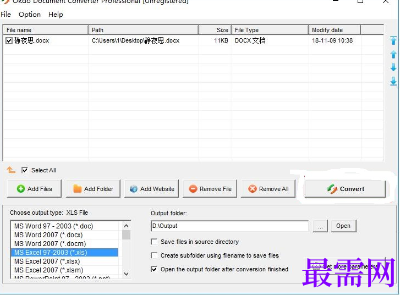
1、打开文件格式转换器后,点击左侧的“Add Files”添加想要转换的文件,如果需要转换整个目录的文件的话,可以点击“Add Folder”来添加目录。